macOS 14+ · iOS 17+ · USB
Put your iPhone anywhere.
Locator sets your iPhone's GPS from a native Mac app — so you can test location-based apps without travelling. No sudo, no Terminal, no jailbreak.
Free · Signed and notarized by Apple, so it opens with no security warning · Requires Xcode for the Developer Disk Image
What it does
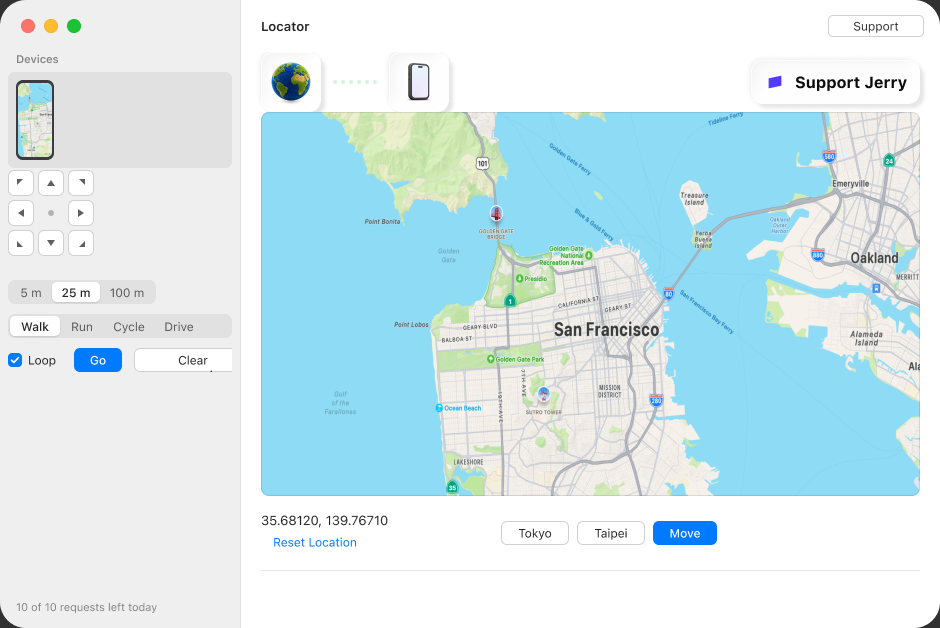
One app, one cable. The simulated location exists only while Locator is running — quit, unplug or restart the phone and iOS restores real GPS by itself.
City presets
Tokyo and Taipei in one click. The active city stays lit until the phone moves somewhere else.
Map and Move
Click anywhere to drop the pin, then Move to send the phone there. The map keeps your zoom level — it only ever re-centres.
Live screen mirror
The sidebar shows the connected phone's display, refreshed every few seconds — watch the app under test react without picking the phone up. Frames come over the same developer tunnel as the location channel.
Joystick
Step the phone 5, 25 or 100 m in any of eight directions. Press and hold to keep walking.
Routes
Drop waypoints on the map and walk them at Walk, Run, Cycle or Drive speed — optionally on a loop.
Never guesses the target
One USB iPhone is selected automatically; with several attached you pick. Unplug and it notices within two seconds; plug back in and it reconnects on its own.
Drives real builds
Works on an installed TestFlight or App Store build, not just apps launched from Xcode.
Free, with a daily cap
The free build allows 10 location requests per calendar day, reset at midnight. A request is a click that asks for a new place.
| Action | Costs |
|---|---|
| A city button — Tokyo, Taipei | 1 request |
| Move — send the phone to the map pin | 1 request |
| Reset Location — back to real GPS | Free |
| Stop — freeze a route where it is | Free |
| Joystick steps and route playback | Free |
Support this project
This is a courtesy limit, not copy protection — the source is public and the daily cap is ten lines of it. It exists to ask politely: if this tool saves you a trip, or a morning of faking coordinates by hand, consider paying for it.
Support via StripeNeed it for commercial use, or the cap lifted? hi@jerrylinn.com
Requirements
- MacmacOS 14 or later, with Xcode installed — Xcode provides the Developer Disk Image.
- iPhoneiOS 17 or later, with Developer Mode enabled (Settings → Privacy & Security → Developer Mode, then restart).
- CableUSB. Wi-Fi does not work — the tunnel this app uses refuses anything but USB, and a phone seen over the network is shown as undrivable rather than pretended to work.
- TrustThe phone unlocked, with this Mac trusted.
usbmuxd or spawn the engine helper. Every tool in this category ships
the same way — signed, notarized, downloaded directly.